NinjaTrader Trade Copier Setup: Prop Firm Compatibility Guide
Learn how NinjaTrader trade copier setup works with prop firm accounts, what to verify before connecting, common mistakes, costs, and alternatives to consider.
A NinjaTrader trade copier setup lets you mirror trades from one account to another — either from a personal account into a funded or evaluation account, or across multiple prop firm accounts simultaneously. Before you connect anything, you need to confirm two things: whether your prop firm explicitly permits trade copying, and whether the specific copier tool you plan to use is compatible with NinjaTrader 8’s architecture. Getting either of those wrong can result in a rule violation, account termination, or trades that simply do not execute as expected. This guide walks through compatibility questions, setup risks, costs to verify, and alternatives so you can make an informed decision before you commit.
What a NinjaTrader Trade Copier Actually Does
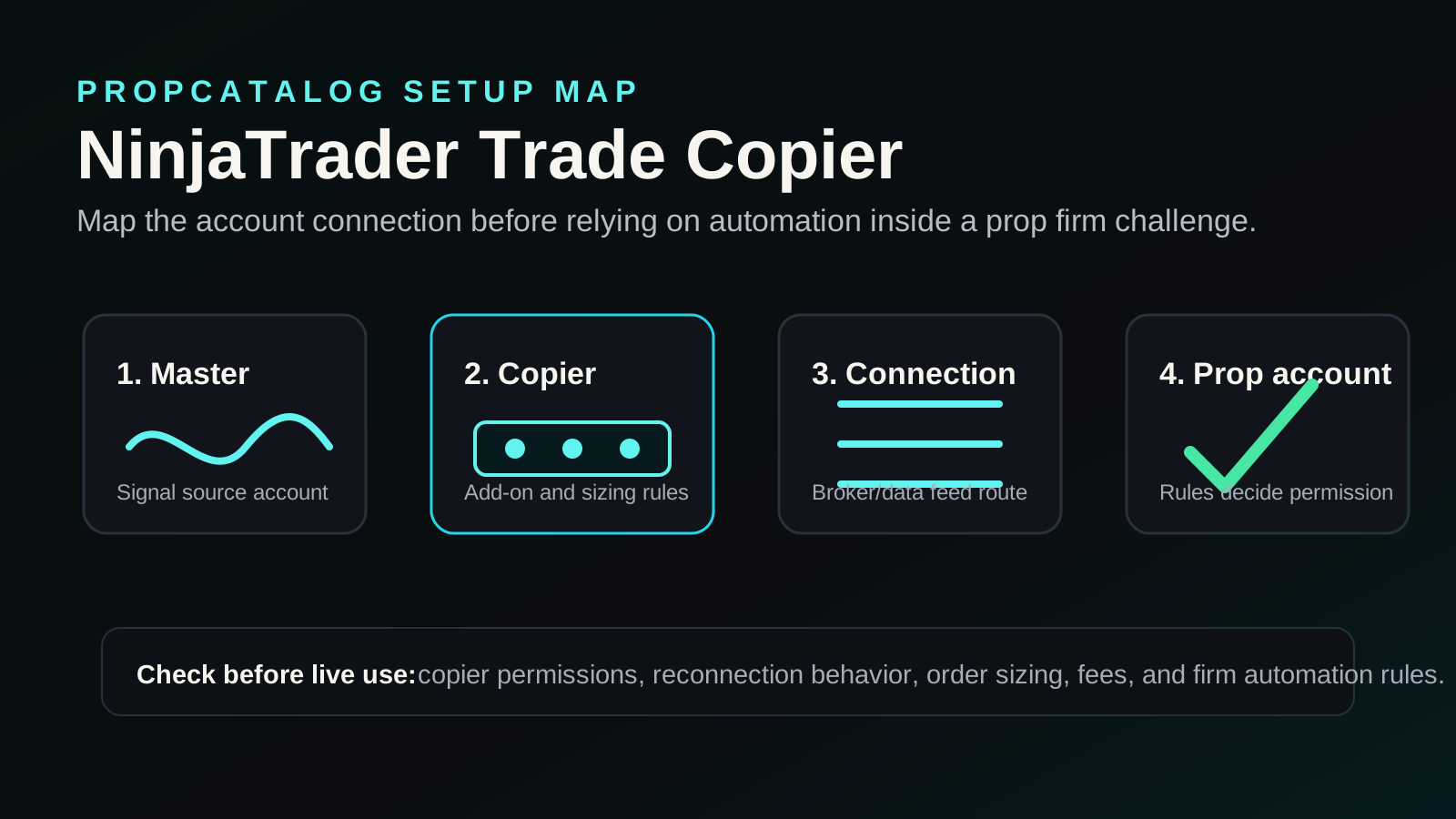
A trade copier in the NinjaTrader environment is a software layer — either a third-party add-on, a NinjaScript-based strategy, or an external bridge — that reads order events from a source account and replicates them on one or more destination accounts. The replication can happen within the same NinjaTrader instance across multiple connections, or between separate machines using a server-based relay.
There are three common architectural approaches you will encounter:
- Local NinjaScript copier: A custom strategy or add-on runs inside NinjaTrader and listens for fills on a master account, then submits matching orders on slave accounts connected in the same platform instance.
- Server-relay copier: A cloud or local server sits between two NinjaTrader instances, often on different machines or different internet connections, and passes order signals between them.
- Broker-level or API bridge: Some copiers bypass NinjaTrader’s UI entirely and communicate directly with the broker’s API, using NinjaTrader only on the signal-source side.
Each approach has different latency profiles, failure modes, and compatibility requirements with prop firm infrastructure. Understanding which type you are using matters before you configure anything.
Which Prop Firms May Support This Platform
NinjaTrader is primarily a futures and derivatives platform. Prop firms that offer futures evaluation accounts — particularly those routing through brokers like Tradovate, Rithmic, or NinjaTrader Brokerage — are the most likely candidates for NinjaTrader compatibility. However, platform support and trade copier permission are two separate questions.
Many futures-focused prop firms list NinjaTrader as a supported front-end. Whether they permit trade copying is a different policy question entirely. You should check the firm’s rules page or contact support directly before assuming copying is allowed. You can browse firm-specific rule summaries in the PropCatalog rules section and cross-reference platform support in the platforms directory.
The table below outlines the types of prop firm structures where NinjaTrader trade copier setups are most commonly attempted, along with the key verification point for each:
| Firm Type | NinjaTrader Likely Supported? | Trade Copier Permission | What to Verify |
|---|---|---|---|
| Futures evaluation (Rithmic-based) | Often yes | Varies by firm | Check rules page for “copy trading” or “automated trading” clauses |
| Futures evaluation (Tradovate-based) | Often yes | Varies by firm | Confirm whether API or third-party automation is restricted |
| Forex prop firms | Rarely | Varies widely | NinjaTrader has limited native forex broker support; verify broker connection |
| Stock/equity prop firms | Uncommon | Varies | Most stock prop firms use proprietary platforms; confirm compatibility |
| Crypto prop firms | Rare | Varies | NinjaTrader has limited native crypto support; bridge tools required |
Do not assume that because a firm supports NinjaTrader as a charting or execution platform, it also permits trade copying. These are separate policy items. Always read the firm’s terms of service and, if unclear, get written confirmation from their support team before setting up any copier.
Setup and Compatibility Notes
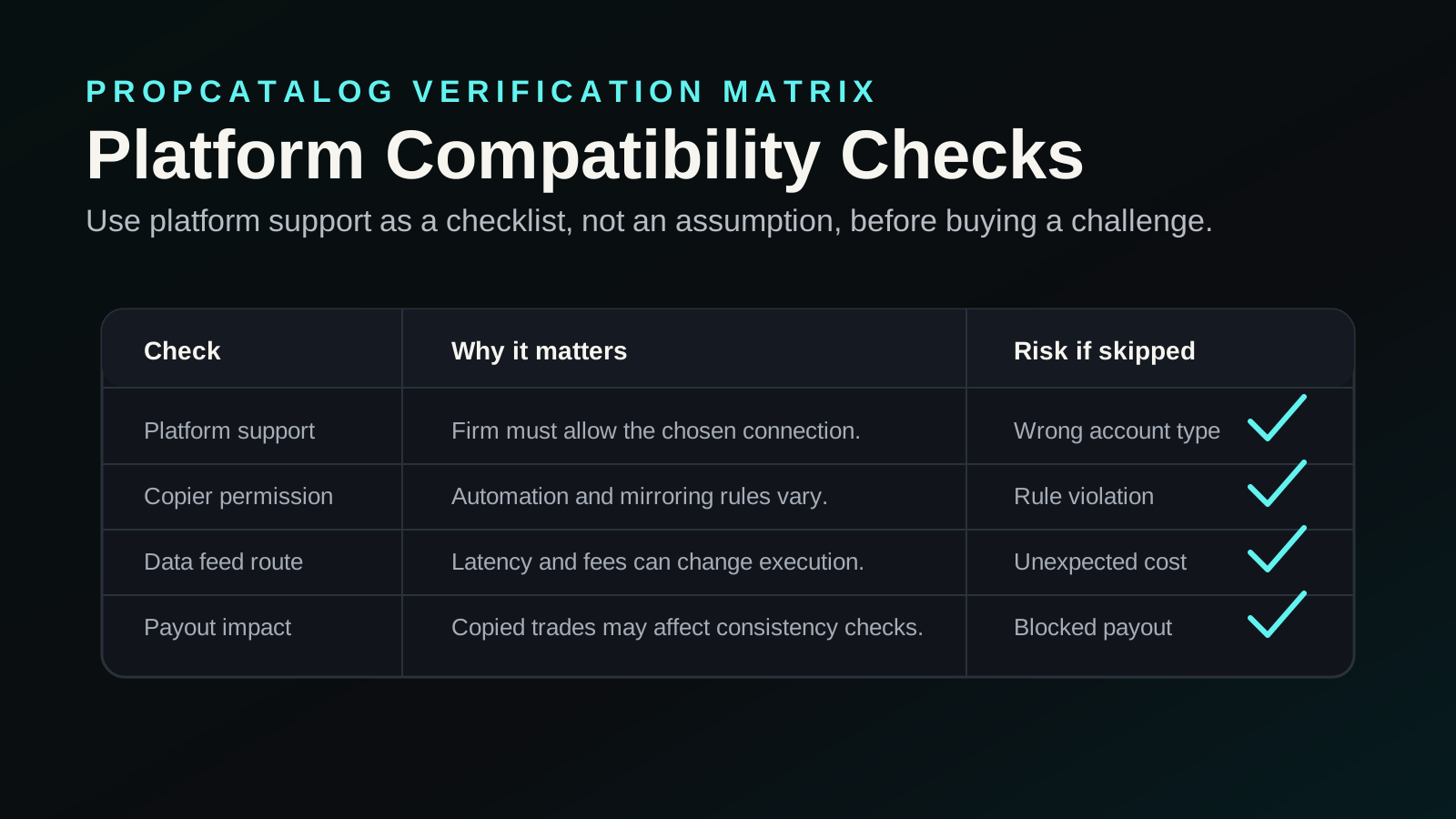
If you have confirmed that your prop firm permits trade copying and that NinjaTrader is a supported platform, the next step is understanding the technical compatibility requirements. These vary depending on the copier tool you choose and the broker connection your prop firm uses.
Broker Connection Compatibility
NinjaTrader connects to brokers through specific adapters. The most common in the prop firm space are Rithmic and Tradovate. Your trade copier must be compatible with the same connection type. A copier built for Interactive Brokers’ TWS API, for example, will not work natively with a Rithmic-connected prop account without additional bridging software.
Before purchasing or installing any copier tool, confirm:
- Which broker connection your prop firm uses (Rithmic, Tradovate, CQG, or other)
- Whether the copier tool explicitly supports that connection type
- Whether the copier requires a separate license for each account or connection
NinjaTrader Version Requirements
Most modern copier add-ons are built for NinjaTrader 8. If you are running an older version, compatibility is not guaranteed. NinjaTrader 8 uses a different NinjaScript framework than NinjaTrader 7, and add-ons are not interchangeable between versions. Verify the copier tool’s stated version compatibility before installation.
Account Permissions and Automated Trading Flags
Some prop firms flag accounts that show automated or API-driven order flow. Even if the firm does not explicitly prohibit trade copying, their risk desk may review accounts where order patterns suggest automation. This is particularly relevant if you are copying from a live personal account into an evaluation account — the timing and sizing patterns can appear systematic. Understand how your firm monitors for this before proceeding.
Latency and Fill Differences
A trade copier introduces latency between the master order fill and the slave account order submission. In fast-moving futures markets, this can result in meaningful slippage on the copied account. If your strategy depends on precise entry timing — scalping, for example — the copied account may show materially different results than the source account. This is not a setup error; it is an inherent characteristic of copy architecture that you need to account for in your risk planning.
Setup Mistake Checklist
The following mistakes are common when traders attempt a NinjaTrader trade copier setup with a prop firm account. Review each point before you go live.
- Not reading the firm’s automation and copy trading rules first. Many firms prohibit copy trading outright or require prior written approval. Skipping this step is the most common and most costly mistake.
- Assuming platform support equals copier permission. A firm listing NinjaTrader as a supported platform does not mean it permits trade copying. These are separate policy questions.
- Using a copier tool not tested with your specific broker connection. Copier tools built for one broker adapter may behave unpredictably or fail silently on another.
- Running the copier on an unstable internet connection. A dropped connection mid-session can leave the slave account in an open position while the master account has already closed. This creates unintended risk exposure on your prop account.
- Not testing on a simulation account first. Running a copier live on a funded or evaluation account without prior simulation testing is a significant risk. Most NinjaTrader broker connections offer a simulation mode — use it.
- Copying position sizes without adjusting for account size differences. If your master account is significantly larger than your prop evaluation account, copying raw lot sizes can immediately breach drawdown limits.
- Ignoring the copier’s error log. Many copier tools log failed order submissions silently. If you are not monitoring the log, you may believe trades are being copied when they are not.
- Not accounting for instrument mapping differences. If the master and slave accounts use different brokers, the same instrument may have a different symbol name. Incorrect mapping means orders are submitted to the wrong instrument or not submitted at all.
- Forgetting to disable the copier before manual overrides. If you manually close a position on the slave account while the copier is active, the copier may attempt to re-enter the position based on the master account’s state.
- Not verifying the copier’s behavior on partial fills. Some copiers handle partial fills poorly, submitting duplicate orders or leaving residual positions. Test this scenario explicitly before going live.
Costs, Data Feeds, and Add-Ons to Verify
A NinjaTrader trade copier setup involves several potential cost layers beyond the prop firm’s evaluation fee. You should verify each of the following before committing to a setup. Specific prices change frequently and should be confirmed directly with the relevant vendor or firm.
NinjaTrader Platform Licensing
NinjaTrader offers a free version with limited functionality and paid licensing options. Some advanced order types and third-party add-on integrations require a paid license. Verify whether the copier tool you intend to use requires a specific NinjaTrader license tier. Check current pricing on NinjaTrader’s official site before purchasing.
Trade Copier Add-On Cost
Third-party NinjaTrader copier add-ons are sold through NinjaTrader’s ecosystem marketplace or directly by developers. Pricing models vary — some charge a one-time fee, others use monthly subscriptions, and some charge per account connection. Verify the licensing model and whether it covers multiple simultaneous connections, which is relevant if you are copying into more than one prop account.
Data Feed Costs
NinjaTrader requires a live data feed for real-time execution. If your prop firm’s broker connection includes a data feed, you may not need a separate subscription. However, if you are running a master account on a personal broker connection, that connection’s data feed costs apply separately. Common data feed providers used with NinjaTrader include Rithmic and Kinetick — verify current subscription costs directly with each provider.
Broker Connection Fees
Some broker connections charge monthly platform or connectivity fees in addition to per-trade commissions. If you are maintaining two separate broker connections — one for the master account and one for the prop firm account — both fee structures apply. Confirm this with your broker and prop firm before calculating your total cost of operation. You can also compare firm-level pricing structures in the PropCatalog pricing section.
VPS or Dedicated Machine Costs
If you plan to run the copier continuously — particularly for a server-relay setup — you may need a Virtual Private Server (VPS) or a dedicated machine that stays online during trading hours. VPS costs vary by provider and specification. This is an optional but often practical cost for traders who cannot keep a local machine running during all market hours.
Best Trader Type for This Setup
A NinjaTrader trade copier setup is not the right fit for every prop firm trader. It tends to work best in specific scenarios and creates unnecessary complexity or risk in others.
Scenarios Where This Setup Makes Sense
- You already trade a systematic or semi-systematic futures strategy on a personal NinjaTrader account and want to mirror it into a prop evaluation account without manually re-entering every trade.
- You have passed a prop evaluation and hold multiple funded accounts with the same or different firms, and you want to manage them from a single master account to reduce execution overhead.
- Your strategy has a low trade frequency, reducing the latency and partial-fill risks that affect faster strategies.
- You have confirmed in writing that your prop firm permits trade copying and automated order submission.
Scenarios Where This Setup Creates More Risk Than It Solves
- You are a discretionary trader who makes frequent manual adjustments mid-trade — copier behavior during manual overrides is unpredictable.
- Your prop firm has not explicitly confirmed that copy trading is permitted.
- Your strategy relies on precise entry timing where even small latency differences produce materially different results on the copied account.
- You are new to NinjaTrader and have not yet tested the platform’s order execution behavior in simulation.
Alternatives to Compare
If a NinjaTrader trade copier setup does not fit your situation — whether due to firm restrictions, platform incompatibility, or cost — there are alternative approaches worth evaluating. You can compare platform options more broadly in the PropCatalog compare section and read firm-specific assessments in the reviews section.
| Alternative | Best For | Key Consideration |
|---|---|---|
| Manual execution on the prop account | Discretionary traders, low trade frequency | No automation risk; requires active monitoring of both accounts |
| Prop firm with built-in copy trading support | Traders who want copying without third-party tools | Some firms offer internal copy features; verify availability and rules |
| MetaTrader 4/5 with a copier (forex-focused firms) | Forex prop traders | MT4/MT5 has a mature copier ecosystem; confirm firm supports MT platform |
| Rithmic-native API automation | Developers comfortable with API integration | Bypasses NinjaTrader entirely; requires coding and firm API permission |
| Running the same strategy independently on each account | Systematic traders with rule-based entries | No copier dependency; each account runs the strategy autonomously |
Each alternative has its own compatibility requirements and rule implications. The right choice depends on your strategy type, the prop firm’s policies, and your technical comfort level. Do not select an alternative based on convenience alone — verify that it is permitted under your firm’s terms before implementing it.

Jade-Kyra Cronje
Jade-Kyra covers trading platforms, strategy-focused content, and crypto prop firm research for PropCatalog.
FAQs
Is trade copying allowed on prop firm accounts?
It depends entirely on the individual firm. Some prop firms explicitly permit trade copying, some prohibit it, and some have ambiguous rules that require direct clarification. You must read the firm’s terms of service and, if the language is unclear, request written confirmation from their support team before setting up any copier. Do not assume permission based on platform support alone.
Can NinjaTrader connect to multiple prop firm accounts simultaneously?
NinjaTrader 8 supports multiple broker connections within a single instance, which is the technical basis for local copier setups. However, whether your prop firm’s broker connection allows multiple simultaneous logins or account connections is a separate question. Some broker adapters restrict concurrent connections. Verify this with both the broker and the prop firm before attempting a multi-account setup.
What happens if the copier loses connection mid-trade?
If the copier loses its connection while a position is open on the master account, the slave account may remain in the open position without receiving the close signal. This creates unintended risk exposure on your prop account. To mitigate this, monitor both accounts actively during trading sessions, set hard stop-loss orders directly on the prop account as a safety measure, and test your copier’s reconnection behavior in simulation before going live.
Do I need a separate NinjaTrader license for each account I copy to?
NinjaTrader’s licensing structure and how it applies to multi-account copier setups depends on the specific license tier and the copier tool’s own licensing terms. Some copier add-ons charge per destination account connection. You should verify current licensing requirements directly with NinjaTrader and with the copier tool’s developer before purchasing. Do not assume a single license covers unlimited connections.
Will a trade copier affect my prop firm evaluation results?
A trade copier can affect evaluation results in several ways beyond rule compliance. Latency between the master fill and the copied order submission can produce different entry and exit prices, which may affect whether you meet consistency rules or daily profit targets. Position sizing mismatches can cause drawdown limit breaches if not adjusted for the prop account’s size. Test the copier’s behavior thoroughly in simulation and account for these differences when planning your evaluation approach.
Are there NinjaTrader copier tools specifically built for prop firm use?
Some third-party developers market their NinjaTrader copier tools specifically toward prop firm traders, with features like proportional position sizing and drawdown limit alerts. Whether any specific tool is appropriate for your situation depends on your firm’s rules, your broker connection type, and your strategy requirements. Research tools through NinjaTrader’s official ecosystem marketplace and verify compatibility with your specific setup before purchasing. PropCatalog does not verify or endorse specific third-party tools.